
Im Maileon Help-Center finden Sie umfassende Dokumentationen zu unserem System.
Beliebte Suchanfragen: Importe | Rest-API | Integrationen | SMS
Webhooks – Outgoing (Calls from Maileon to Third-Party-Webhook)
Description
External webhooks are resources that allow Maileon to instantly submit information to a third party system when a given event like an unsubscription occurs. Webhooks use HTTP POST requests to submit the information. Maileon sends one request per event and webhook; events are not combined into a single request. If the product is enabled for you, you can set up the webhooks in Maileon under “Settings > Webhooks”.
Important Notice
Maileon webhooks currently do not include a checksum, signature or verification token. To verify that a request originates from Maileon, protect your endpoint with HTTP Basic Authentication and verify the submitted contact ID via the Maileon API (see Security).
Possible event types:
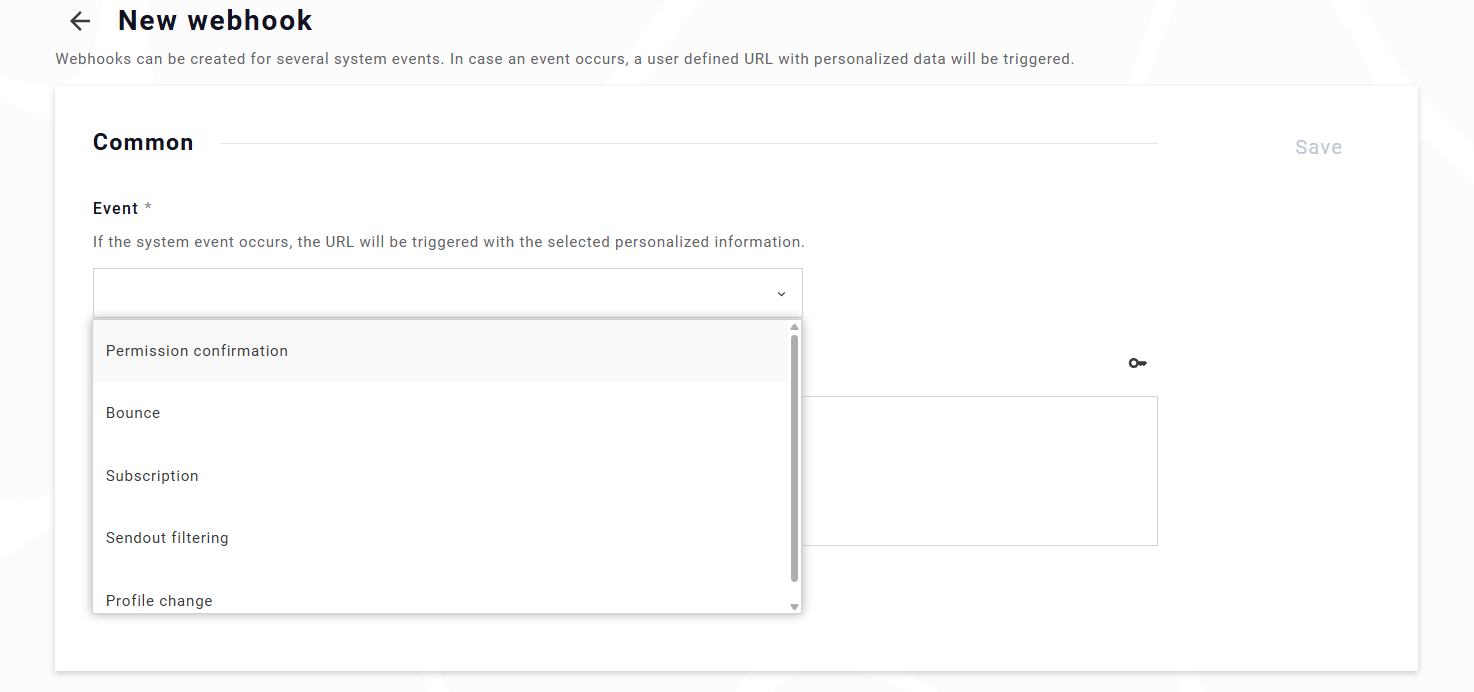
- Permission confirmation (DOI confirmation)
This is sent as soon as a contact clicks on the DOI or DOI+ confirmation link in an email. The event is sent only once per confirmation process; clicking the link again after a successful confirmation does not trigger it again. It is not sent for contacts who have already unsubscribed. - Bounce
As soon as a bounce is received, this webhook will be called. This includes hard bounces (status codes 5.x.x) and soft bounces (status codes 4.x.x). The bounce type is not submitted separately; it can be derived from the submitted status code. For a list of bounce codes, please check this page: bounce codes - Unsubscription
All possible ways to unsubscribe, e.g. unsubscribe link in mails, List-Unsubscribe header, API, manual unsubscriptions in the UI, spam complaints or reply mails. The source can be submitted as fieldmethod; possible values are identical with the unsubscription reports resource:Value Source linkUnsubscribe link in a mailing list-unsubscribe-headerList-Unsubscribe header (e.g. unsubscribe button in the mail client) apiUnsubscription via API manualManual unsubscription in the Maileon UI complaintSpam complaint (feedback loop) replyReply mail requesting unsubscription importUnsubscriber import contactsjobUnsubscription by a contact job, e.g. „unsubscribe contacts not included in the import“ wa-actionMarketing automation action otherOther sources, e.g. hosted unsubscribe pages or workflows - Sendout filtering (Personalization errors)
Mails failed due to errors while generating the mailing for a contact, such as a missing mandatory field (e.g., lastname) without an available fallback, an invalid email address, an attachment that cannot be downloaded or a template error. The cause is submitted as fieldreason(see JSON Information). Contacts excluded by blocklists are not reported via this webhook. - Profile change (Contact field change)
This is triggered in two cases:- A contact clicks a „contact field change link“ in a mailing; so e.g. if you send a link that changes some field from true to false, this will trigger this webhook. The webhook is only sent if the value actually changes.
- A contact unsubscribes from a mailing for which the option „Contact field change on unsubscription“ is activated. In this case, the contact is not unsubscribed; instead, the configured contact field is changed and this webhook is sent. No unsubscription webhook is sent in this case.
It will NOT trigger when contacts are updated via UI, API or imports.
Event-type-specific retry behavior
For contact_field_change, doi and unsubscription events, Maileon makes a maximum of four delivery attempts: directly when the event occurs, after 5 minutes, after 1 hour and after 22 hours.
All other event types (bounce, sendout filtering) have one delivery attempt, directly when the event occurs.
In addition, within each delivery attempt, the HTTP request may be repeated up to three times in quick succession if the endpoint responds with 429, 500, 502, 503 or 504. This applies to all event types (see Delivery attempts and HTTP request retries).
Technical Details
| Property | Value | Notes |
|---|---|---|
| HTTP Protocol | HTTPS | Webhook URLs must use https://. Event data is encrypted in transit. |
| HTTP Method | POST | All webhook calls are sent as HTTP POST requests. |
| Request body | Always sent | The body is a JSON object. If no JSON information is selected, an empty JSON object {} is sent. |
| Content-Type header | application/json; charset=UTF-8 | Set on every request. |
| User-Agent header | Fixed value, contains Maileon/ |
Currently Mozilla/5.0 (X11; Linux x86_64) AppleWebKit/537.36 (KHTML, like Gecko) Chrome/144.0.0.0 Safari/537.36 Maileon/1.0. The version numbers may change with updates. Can be used for firewall or WAF rules. |
| Authorization header | Basic (optional) | Sent with every request if HTTP Basic Authentication is configured. |
| Connection timeout | 5 seconds | If no connection can be established within 5 seconds, the request is treated as failed. |
| Response timeout | 5 seconds | If the endpoint does not send any response data for 5 seconds, the request is treated as failed. A single request can therefore take up to approx. 10 seconds before it counts as failed. |
| Redirect handling | Redirects are followed | See Redirect handling. We recommend configuring the final target URL directly instead of relying on redirects. |
| TLS / certificate errors | Failed request | Certificate validation errors (e.g. expired certificate, hostname mismatch) are treated as failed requests. For retry-enabled event types, the delivery is retried according to the retry schedule. TLS 1.2 and TLS 1.3 are supported. |
| Successful response codes | 2xx | Any HTTP status in the 2xx range ends all retries and marks the event as delivered. |
| Failed responses | 3xx (not followed), 4xx, 5xx + TLS/network errors | These responses and errors, including timeouts and connection issues, are treated as failed requests. For retry-enabled event types, failed delivery attempts are retried according to the retry schedule. |
| HTTP request retries | Up to 3 additional requests on 429, 500, 502, 503, 504 | Within one delivery attempt, the request is repeated up to three times with a delay of 2 seconds. A Retry-After header is not evaluated. Applies to all event types. |
| Initial delivery | Immediately on occurrence | Events are normally sent immediately when they occur. When a large number of events occurs at the same time (e.g. after a mailing sendout), the initial delivery is queued and processed as soon as possible. The order of delivery is not guaranteed. |
| Delivery attempts | 4 for retry-enabled events; 1 for all other events | Retry-enabled events have up to four delivery attempts: the initial delivery plus up to three delayed retries. All other event types have one delivery attempt, directly when they occur. |
| Maximum HTTP requests per event | 16 for retry-enabled events; 4 for all other events | Up to 4 delivery attempts with up to 4 HTTP requests each. Additional HTTP requests only occur if the endpoint responds with 429, 500, 502, 503 or 504. |
| Backoff strategy | 5 min → 1 h → 22 h | Fixed, increasing intervals between delayed delivery attempts. |
| Error-rate protection | Dynamic reduction | A high number of failed delivery attempts reduces the number of further delivery attempts, up to discarding events completely. See Error-rate protection. |
| Retry-enabled event types | contact_field_change, doi, unsubscription | These event types have up to four delivery attempts: directly on occurrence, after 5 minutes, after 1 hour and after 22 hours. Failed delivery attempts include 3xx, 4xx, 5xx, TLS and network errors. |
Delivery attempts and HTTP request retries
Maileon distinguishes between two levels of retries:
| Level | Description |
|---|---|
| Delivery attempt | One scheduled attempt to deliver the webhook event. Retry-enabled event types have up to four delivery attempts: immediately, after 5 minutes, after 1 hour and after 22 hours. All other event types have one delivery attempt. |
| HTTP request retry | Within one delivery attempt, the HTTP request is repeated up to three times if the endpoint responds with 429, 500, 502, 503 or 504. The retries are sent 2 seconds apart. |
Example for a retry-enabled event when the endpoint responds with 503:
Delivery attempt 1
  POST → 503
  ↓ 2 sec
  POST → 503
  ↓ 2 sec
  POST → 503
  ↓ 2 sec
  POST → 503
        ↓ 5 min
Delivery attempt 2
  POST → 200   (event delivered, no further requests)
Because of these retries, your endpoint may receive the same event more than once. Make sure that your endpoint processes events idempotently, e.g. by ignoring duplicates.
Redirect handling
Redirects (3xx responses with a Location header) are followed automatically, up to a maximum of 50 redirects.
| Status | Behavior |
|---|---|
| 301 / 302 / 303 | Redirect is followed. The request is changed to GET; the JSON body is not sent to the new target. |
| 307 / 308 | Redirect is followed. Method (POST) and JSON body are preserved. |
| 307 / 308 to a different host with Basic Authentication | Redirect is not followed, to avoid forwarding credentials. The request is treated as failed. |
| 3xx without Location header, 300 / 304 / 305 | Not followed. Treated as a failed request. |
Important: If a 301, 302 or 303 redirect leads to a target that responds with 2xx, the event is considered successfully delivered, although the target did not receive the JSON body. Always configure the final target URL.
Error-rate protection
Maileon tracks the number of failed delivery attempts per webhook. If a webhook fails very often, the number of delivery attempts is reduced to protect the system and other webhooks:
| Failed delivery attempts | Retry-enabled events | All other events |
|---|---|---|
| Fewer than 50 | up to 4 delivery attempts | 1 delivery attempt |
| 50 or more | up to 2 delivery attempts | 1 delivery attempt |
| 200 or more | 1 delivery attempt | 1 delivery attempt |
| 1000 or more | no delivery, events are discarded | no delivery, events are discarded |
The error counter is reset once no failed delivery attempt has occurred for one hour. As long as the endpoint keeps failing, the counter keeps increasing.
Important: Discarded events are not sent and are not counted in the webhook statistics. If your endpoint is unavailable for a longer period, events may be lost.
Retry behavior for critical events
For contact_field_change, doi and unsubscription events, failed delivery attempts are automatically retried even if the receiving endpoint returns a 3xx or 4xx HTTP status code or a TLS/certificate error.
These events have a maximum of four delivery attempts: directly when the event occurs, after 5 minutes, after 1 hour and after 22 hours. All other event types have one delivery attempt, directly when the event occurs.
This ensures that temporary problems on the receiving side do not immediately result in the event being discarded. For example, a temporarily unavailable or not-yet-deployed receiving service may return a 404 Not Found, or a Web Application Firewall (WAF) may reject a request with a 406 Not Acceptable. Such responses are treated as failed delivery attempts and are retried for the affected event types.
Once the receiving endpoint responds with a 2xx status code, the webhook event is considered successfully delivered and no further retries are performed.
Security
Webhook endpoints can be secured using HTTP Basic Authentication, which is fully supported and recommended. The credentials are sent with every request in the Authorization header. Customers may also request the source IP addresses used for webhook delivery from our service team to configure firewall allowlists if required.
Webhook calls require an HTTPS URL (HTTP over encrypted TLS), ensuring that event data and Basic Authentication credentials are protected in transit against interception or tampering.
For privacy and compliance reasons—especially under the GDPR—we strongly recommend avoiding sensitive data in URL parameters. Web servers typically log query strings by default, which can unintentionally expose personal information (e.g., email addresses, external IDs) in access logs. Instead, sensitive values should be transmitted in the POST body, where logging can be controlled more tightly.
To further reduce data exposure risks, we advise only submitting a minimal identifier (such as the contact ID) and then retrieving the full contact details via the API on your side. This approach limits the amount of personal data transmitted via webhook and minimizes the potential security impact if an endpoint is misconfigured or logs leak.
To ensure authenticity, verify the submitted contact ID by querying the contact over the API before processing the event, e.g. by checking that the contact exists and that its status matches the event (such as an unsubscription). This provides an additional layer of protection against spoofed or malicious requests. Webhooks currently do not include a checksum or signature.
For security reasons, webhook URLs must point to a publicly reachable host. URLs whose host cannot be resolved or resolves to a local or private address (e.g. localhost, 127.0.0.1, 10.x.x.x, 192.168.x.x) are rejected when the webhook is saved.
Configuration
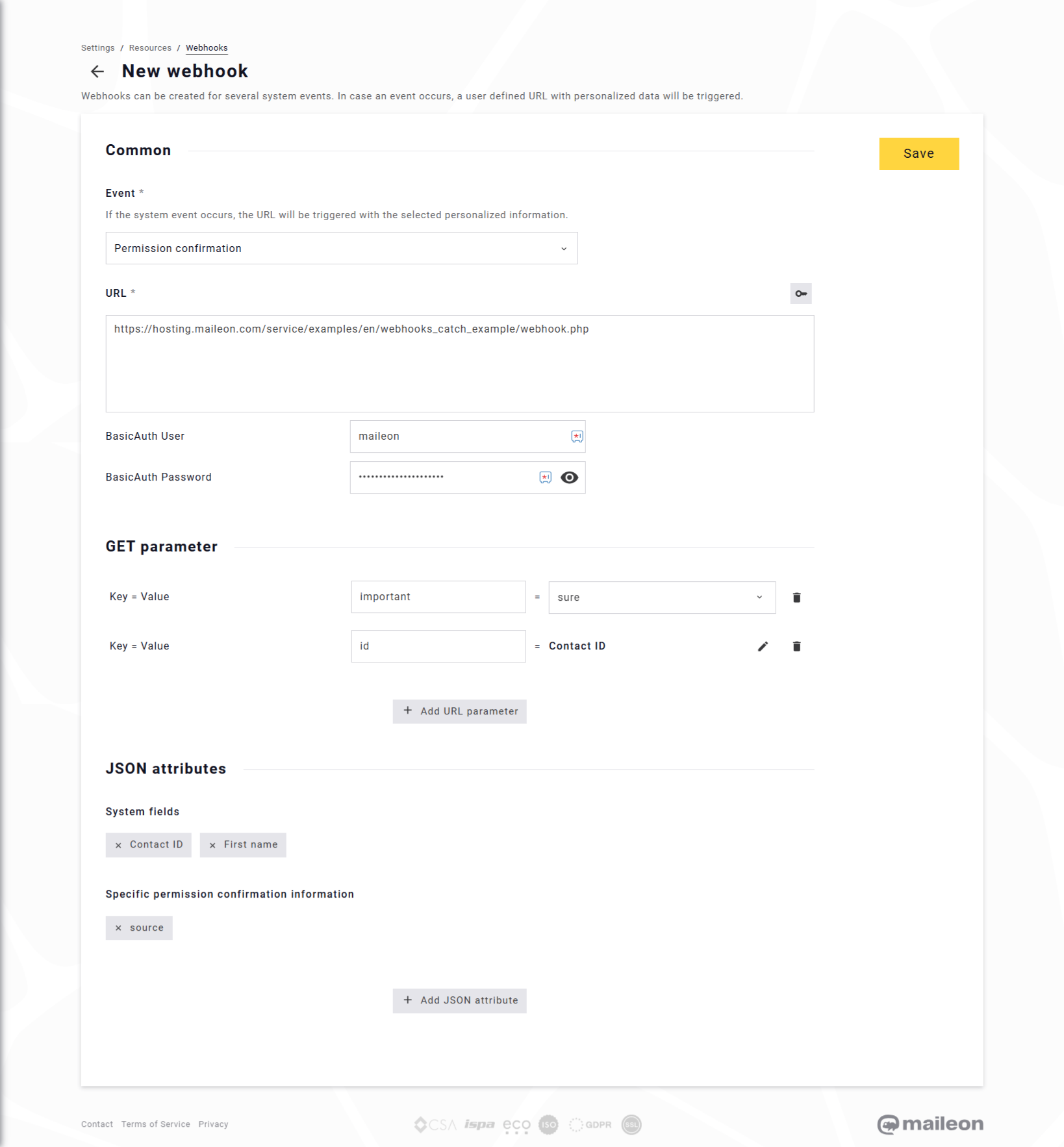
To configure a webhook, click Add webhook and select the event type you want to listen to (e.g., Unsubscription, Permission confirmation, Profile change). The selected event determines when Maileon will trigger the webhook.
Note: contact_field_change, doi and unsubscription events use the extended retry logic described in the Technical Details section. They have up to four delivery attempts; all other event types have one delivery attempt.
Note: you can also create webhooks using the API. Profile change (contact_field_change) webhooks can currently only be created in the UI.
HTTP Post URL
Enter the target URL that should receive the webhook.
This URL is the endpoint Maileon will call whenever the selected event occurs. The URL must start with https://. Use the final target address (no redirects).
Authentication (optional)
Under Advanced Settings you can define HTTP Basic Authentication by entering a username and password. The characters : and @ are not allowed.
If configured, Maileon will include these credentials in every POST request.
URL Parameters (optional)
You may add additional URL parameters using key–value pairs. As value, you can select either a contact field value (standard or custom contact field) or a user-defined value (static text).
These parameters are URL-encoded and appended to the webhook URL (e.g., ?important=sure).
Due to GDPR and logging considerations, avoid placing sensitive personal data in URL parameters.
JSON Information (optional)
If you enable Integrate JSON information, you can select which information is included in the JSON body of the POST request:
- Contact ID (submitted as
contact_id) - Standard contact fields, e.g. email address, first name, last name, external ID
- Custom contact fields (submitted with the name of the custom field as key)
- Event-specific fields (see table below)
All values are submitted as strings. Fields are only included if a value is available, e.g. msg_id and mailing_id are missing for unsubscriptions via API.
| Event type | Event-specific fields |
|---|---|
| Permission confirmation (doi) | timestamp, mailing_id, ip (only if storing the IP address is enabled in the DOI settings), doi_mailing_key |
| Bounce (bounce) | timestamp, msg_id, mailing_id, transaction_id, code (e.g. 5.1.1), source (mta-listener or inbound), dsn_status, dsn_diag |
| Unsubscription (unsubscription) | timestamp, permission_change_timestamp, msg_id, mailing_id, transaction_id, method, reasons |
| Sendout filtering (filtered) | timestamp, mailing_id, transaction_id, reason, reason_details |
| Profile change (contact_field_change) | timestamp, msg_id, mailing_id, transaction_id, property, old_value, new_value |
Formats:
timestamp: SQL datetime formatyyyy-MM-dd HH:mm:ssin Maileon server time (Europe/Berlin), without timezone offset. For profile change events, the timestamp reflects the time the event was processed.permission_change_timestamp: Unix timestamp in milliseconds.
Possible values of reason (sendout filtering):
| Value | Meaning |
|---|---|
unspecified_error |
Unknown error |
standard_property |
Missing or invalid standard contact field (reason_details contains the field) |
custom_property |
Missing or invalid custom contact field (reason_details contains the field) |
reserved_property |
Missing reserved field |
account_property |
Missing account property (reason_details contains the property) |
mailing_property |
Missing mailing property (reason_details contains the property) |
other_property |
Other missing personalization value (reason_details contains the name) |
transaction |
Missing transaction attribute (reason_details contains the path) |
contact_event |
Missing contact event data |
conditional_content |
Error in conditional content |
contact_filter |
Error in a contact filter used in the mailing |
external_json |
Error retrieving external JSON content |
external_file |
Error retrieving an external file (reason_details contains details) |
template |
Template error (reason_details contains details) |
invalid-email |
Invalid email address |
invalid-dateformat |
Invalid date format |
attachment_cannot_be_downloaded |
Attachment could not be downloaded |
attachment_too_big |
Attachment exceeds the size limit |
nocontent |
Mailing has no content |
uri-personalization |
Error in a personalized link |
This provides a structured JSON object that your receiving system can parse.
For minimal data transmission, we recommend enabling only the Contact ID plus required event fields, and then retrieving additional details via the Maileon API.
The information is submitted as plain JSON object with Content-Type „application/json; charset=UTF-8“.
Example (unsubscription):
{
  "contact_id": "1234567",
  "email": "example@domain.com",
  "timestamp": "2025-11-19 10:23:45",
  "method": "link"
}
Example (profile change):
{
  "contact_id": "1234567",
  "timestamp": "2025-11-19 10:23:45",
  "mailing_id": "98765",
  "property": "newsletter_topic_sports",
  "old_value": "true",
  "new_value": "false"
}
Saving the Webhook
After completing your configuration, save the webhook.
Maileon will immediately begin triggering the webhook for the selected event type using the defined URL, parameters, authentication, and JSON body.
Testing
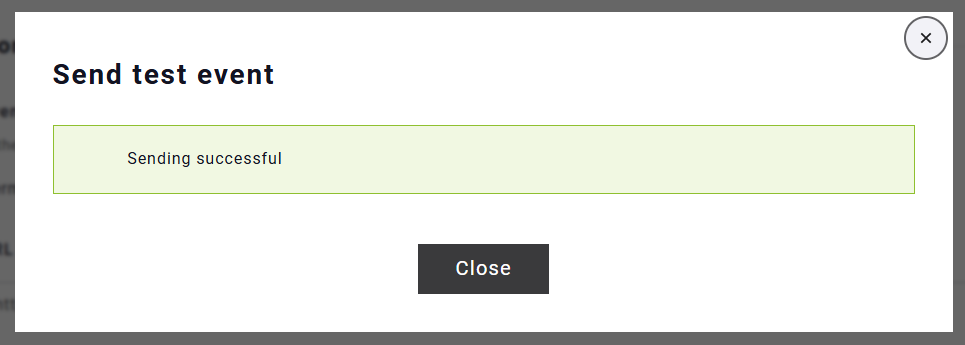
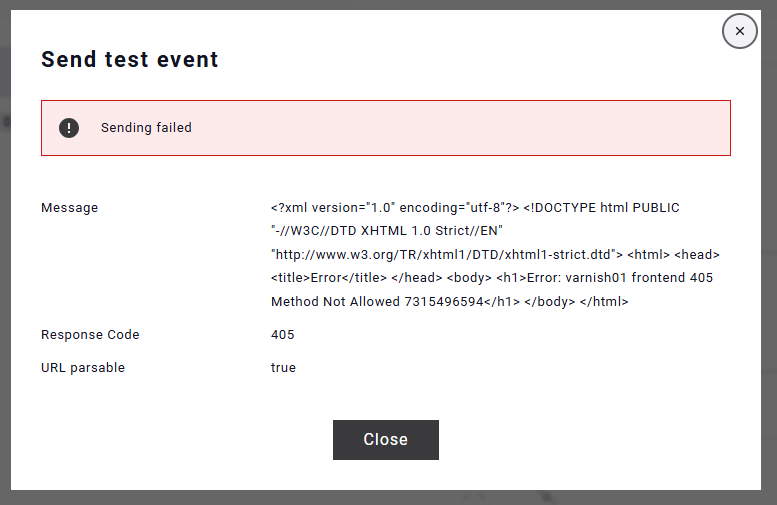
After saving a webhook configuration, you can send a test event (Send test event) to the specified URL. The test request contains placeholder values (e.g. dummy, random IDs, the current timestamp). The result, including the HTTP status code and the response of your endpoint, is displayed directly in the interface. This allows you to verify that your endpoint is reachable, accepts the POST request, and responds correctly.
For more realistic end-to-end testing, we recommend performing integration tests using real Maileon events. For example:
- Create a test contact in Maileon.
- Trigger an event manually (e.g., click unsubscribe in the UI or complete a DOI process).
- Verify that your webhook endpoint receives the event as configured.
Testing retry behavior
To verify the extended retry behavior, perform integration tests with one of the retry-enabled event types: contact_field_change, doi or unsubscription.
The receiving endpoint can intentionally return a failure response, such as a 404 Not Found, 406 Not Acceptable or another 4xx/5xx response. For retry-enabled event types, Maileon will retry the delivery according to the retry schedule described above. Note that responses with 429, 500, 502, 503 or 504 additionally trigger up to three immediate HTTP request retries per delivery attempt.
After the receiving endpoint becomes available again and returns a 2xx response, the webhook event is considered successfully delivered.
This type of integration test is particularly useful for verifying webhook behavior during temporary service outages, deployments or WAF-related blocking. Keep the number of test failures low: frequent failures reduce the number of delivery attempts (see Error-rate protection).
Maileon also provides a hosted example script for testing:
https://hosting.maileon.com/service/util/webhooks_debugger/index.php
This script displays the last received URL and JSON body, making it easy to debug your integration.
Important: This page uses a vault ID to separate customer data, but you must not send sensitive data to it. Only use this tool to test a webhook with test data.